
Is Your Vibe-Coded App Leaking Data and Draining Your Budget?
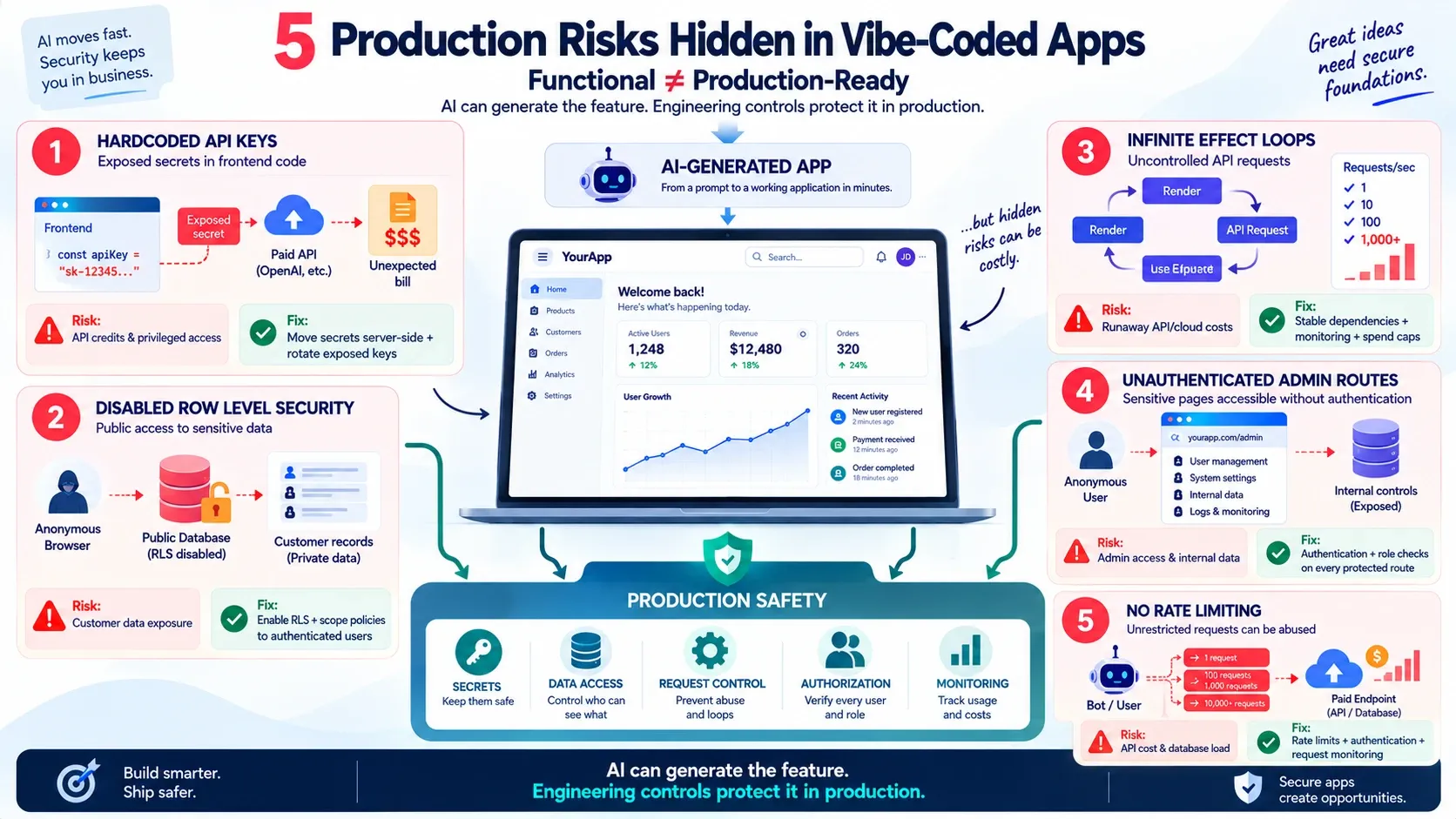
You open your dashboard the morning after launch expecting your first users. Instead, you find a cloud bill with three extra zeros on it, or worse, a message from a stranger telling you your entire user table is sitting in a public Telegram channel.
This is not a rare horror story anymore. It is the quiet, recurring failure mode of “vibe coding,” building real products by prompting AI tools like Claude Code, Cursor, and Windsurf until the UI looks right and the feature works. These tools are genuinely excellent at writing functional code fast. What they are not automatically good at is thinking like a security engineer, because you never asked them to.
The UI can look production-ready while the architecture underneath is wide open. Below are five mistakes we see most often when AI-assisted codebases meet the real internet, why each one gets expensive fast, and exactly how to close them before you publish.
The uncomfortable part: none of these five mistakes require a hacker. A curious visitor pressing F12 in their browser, a bored bot scanning random domains, or a single forgotten background tab is enough to trigger any of them. That’s what makes them so common, and so avoidable, in AI-generated codebases.
Why Vibe-Coded Apps Get Hit Harder Than Traditionally Built Ones
When a developer writes an API integration by hand, security is a conscious decision made in the moment: “should this key live on the server or the client?” When an AI assistant writes the same code, it optimizes for “does this work when I test it,” not “does this hold up when a stranger inspects it.”
That difference is the entire problem. AI-generated code runs fine in preview, fine in your client demo, and keeps running fine right up until launch, when someone runs a five-second check against it using nothing more than their browser’s F12 console.
Mistake 1: Hardcoded API Keys Sitting in Your Frontend Code
This is the single most common way an early-stage founder wakes up to a drained OpenAI or Anthropic account.
Ask an AI assistant to “connect to the OpenAI API” or “add a Supabase client,” and it will often write the key directly into a React component, a Next.js page, or a client-side .js file, because that’s the fastest way to make the feature work. It compiles. It works in preview. You ship it.
The problem is that anything shipped to the browser is downloadable by anyone who visits your site. A visitor presses F12, opens the Sources or Network tab, and your sk-... key or Supabase service_role key is sitting right there in plain text. A single exposed key is often all it takes to drain an entire month’s AI budget in minutes, and if it’s your service_role key, the attacker can bypass every permission your database was supposed to enforce.
How to actually fix it:
- Never call a paid or privileged API directly from client-side code. Route it through a backend endpoint or serverless function you control.
- Store real secrets in server-side environment variables, never in anything bundled into the frontend build. In Supabase, only the public
anonkey belongs in frontend code. - Rotate any key immediately if you find it was ever exposed, even briefly, in a public repo or a deployed bundle.
Mistake 2: Row Level Security Left Disabled on Supabase or Firebase
This is the mistake that turns “we had a bug” into “we had a data breach.”
Supabase and Firebase both give you a real database directly reachable from the browser, which is powerful for building fast. But that power comes with a condition: Row Level Security (RLS) has to be configured to say who can read and write which rows. AI coding assistants frequently get you through setup with RLS left in a permissive or fully public state, because a public policy is the fastest way to make your feature “just work” during development.
The catch is that a public RLS policy doesn’t just mean logged-in users can read more than they should. It means anyone, with no login at all, can open a browser console and pull every row in every exposed table by firing a raw fetch request straight at your database’s public API URL. Your entire user list, every order, every private message, all retrievable with a request that takes less time to write than this sentence.
How to actually fix it:
- Treat RLS as mandatory, not optional, before any real user data enters the database. Enable it on every table that isn’t meant to be fully public.
- Write policies scoped to
auth.uid()(Supabase) or the equivalent authenticated check (Firebase), so a user can only touch their own rows. - Test policies as an anonymous, unauthenticated request, not just from your own logged-in browser session where you may have elevated access without realizing it.
- Re-check RLS every time a new table is added, since it isn’t automatically covered by rules you wrote for other tables.
We cover the practical decision process for this in more depth in our guide on when to add row-level security to a Supabase SaaS MVP, including how to phase it in without blocking early development speed.
Mistake 3: Infinite Rendering Loops Quietly Burning Through API Requests
This one doesn’t look like a security bug at first. It looks like a billing bug, and by the time you notice, the damage is already sitting on your invoice.
React’s useEffect hook re-runs whenever something in its dependency array changes. AI assistants sometimes get that array wrong: an object or function gets recreated on every render, the effect fires again, that triggers a state update, which causes another render, which fires the effect again. The loop repeats as fast as the browser can execute it.
If that effect happens to contain an API call, a Supabase query, or a call to a paid AI model, you don’t get one request per page load. You get hundreds or thousands, often from a single tab a single user forgot open in the background overnight.
Real case: a single idle browser tab generated over 2,000 API requests before anyone noticed, simply because a
useEffectdependency array was referencing a freshly created object on every render instead of a stable value. Multiply that by a handful of forgotten tabs across your early users, and a small bug becomes a bill you have to explain to a co-founder.
How to actually fix it:
- Always specify a complete, correct dependency array for every
useEffect— missing dependencies and unstable references (new objects, arrays, or functions created inline) are the two most common causes of this loop. - Use your browser’s Network tab during testing and watch for a request count that keeps climbing on a page you’re not actively interacting with.
- Add rate limiting or request-count monitoring on any endpoint that touches a paid third-party API, so a runaway frontend loop hits a wall instead of an open bill.
- Set usage alerts and hard spending caps directly in your OpenAI, Anthropic, and cloud provider dashboards. This won’t stop the bug, but it stops the bug from becoming a $1,000 surprise.
Mistake 4: Admin and Internal Routes Shipped Without Real Authentication
This mistake hides in plain sight because the feature works perfectly for you, the only person who knows the URL exists.
Ask an AI assistant for “an admin dashboard to manage users” or “an internal API to update order status,” and it will often build the page correctly while skipping the authentication check, because you never explicitly asked for one. The result is a fully functional /admin, /internal-api, or /debug route sitting on your production domain with no login gate at all, relying on nobody guessing the URL.
Obscurity is not security. Automated bots routinely crawl common paths like /admin, /api/internal, and /.env on every domain they find, with no idea what your product even does. If the route responds without asking who’s asking, it will eventually be found, and whoever finds it gets the same access you have.
How to actually fix it:
- Require authentication and role checks on every route that isn’t meant to be fully public, including ones you built “just for yourself” during development.
- Never rely on an unlisted or hard-to-guess URL as your only protection, treat every route as discoverable.
- Test every admin and internal route the same way you tested RLS: as a logged-out, unauthenticated request, not from your own already-logged-in browser session.
- Ask your AI assistant directly, “does this route check authentication and role before returning data?”, rather than assuming it did.
Mistake 5: No Rate Limiting on Paid or Sensitive Endpoints
This is the mistake that turns a curious visitor, or a bot that found your API by accident, into your biggest line item of the month.
Even with keys secured and RLS enabled, an endpoint that accepts unlimited requests from unlimited sources is still an open tap. AI-generated backend code frequently ships functional but unthrottled: an endpoint that calls a paid AI model or writes to your database will process every request it receives, as fast as it receives them, with no concept of “too many, too fast” unless someone explicitly built that in.
Unlike the runaway useEffect loop (an accidental bug in your own frontend), this risk comes from outside: a scraper or a bot hammering your public endpoint on purpose, precisely because nothing is stopping it.
How to actually fix it:
- Add rate limiting at the endpoint or API-gateway level for any route that costs you money per call or touches sensitive data, capping requests per IP or per user within a time window.
- Require authentication before an expensive operation runs, an unauthenticated request should never be able to trigger a paid AI call or a bulk database write.
- Use your hosting platform’s or API gateway’s built-in throttling (Vercel, Cloudflare, Supabase Edge Functions, and API gateways like Kong or AWS API Gateway all support this) rather than trying to hand-roll it.
- Monitor for request spikes from a single IP or user ID, a sudden, sustained burst is a signal worth an alert, not just a billing line you notice later.
Quick Comparison: What Each Mistake Actually Costs You
| Mistake | What Gets Exposed | Typical Trigger | Fastest Fix |
|---|---|---|---|
| Hardcoded API keys | AI/API credits, paid usage | Key pasted into frontend code by AI assistant | Move calls to a backend endpoint, rotate the key |
| Disabled Row Level Security | Entire database contents | Public/permissive RLS policy left from setup | Enable RLS, scope policies to auth.uid() |
Infinite useEffect loops |
Cloud/API billing | Missing or unstable dependency array | Fix dependency array, add rate limits and spend caps |
| Unauthenticated admin/internal routes | Full admin access, internal data | Route built without an auth check | Add auth and role checks to every route |
| No rate limiting on paid endpoints | Cloud/API billing, database load | Endpoint left open to unlimited requests | Add rate limiting and require auth before expensive calls |
The 5-Minute Self-Audit You Can Run Right Now
You don’t need a security team to catch most of this. Before your next deploy, run through these checks yourself:
- Open DevTools on your live site (F12 → Sources or Network tab) and search for
sk-,service_role, or any string that looks like a database connection URL. If you find one, rotate it immediately and move that call server-side. - Open your Supabase or Firebase dashboard and check RLS status on every table. Anything showing “public” or “disabled” next to a table holding real user data is a table anyone can query right now.
- Open your Network tab on a page with a
useEffectand leave it idle for 30 seconds. If the request count keeps climbing without you clicking anything, you have a loop, not a feature. - Check your OpenAI, Anthropic, and cloud billing dashboards for usage alerts. If you haven’t set a hard spending cap, do it before you finish reading this sentence, not after.
- Try loading your admin, internal, or debug routes in an incognito window while logged out. If you can still see the page or get data back, that route has no real authentication.
- Check whether your paid or sensitive endpoints have any rate limiting configured. If a script could call the same endpoint 10,000 times in a row without being slowed down or blocked, it doesn’t.
Five minutes now is cheaper than every scenario this article describes.
This Isn’t a Reason to Stop Using AI Coding Tools
None of this means Claude Code, Cursor, or Windsurf are unsafe tools, or that AI-assisted development should be avoided. They are genuinely capable of producing production-quality code, including secure patterns, when the person directing them checks for the right things. The tools aren’t the failure point. Shipping without a security-focused review is.
Treat every AI-generated feature the way you’d treat a pull request from a junior developer: probably fine, but worth a second pair of eyes on anything touching secrets, database permissions, or paid API calls before it goes live. That review takes an afternoon. A $1,000 bill or a leaked database takes a lot longer to clean up, and can cost far more than money once customer trust is involved.
If you’re already deep into a vibe-coded build and want a structured way to close these gaps before real users arrive, our checklist on what to do after you vibe code your MVP walks through testing, security, and scaling steps in order. It’s also worth checking your hosting setup against common cloud hosting mistakes that inflate a startup’s bill, since billing surprises rarely come from just one source. And if your AI assistant has ever suggested installing a package you didn’t recognize, read about why AI coding tools sometimes invent fake packages before you run that install command.
Want a Security-First Review of Your Vibe-Coded MVP?
MVPHUB helps founders turn AI-generated prototypes into secure, production-ready products, catching exposed secrets, database permission gaps, and runaway API usage before they become expensive surprises. Book a free consultation with MVPHUB to get your codebase reviewed before you scale.
Book a free consultation with MVPHUBFrequently Asked Questions
Why did my cloud bill suddenly jump to over $1000 after launching my app?
The most common causes are a hardcoded API key that got copied and abused by someone else, a runaway loop in your frontend code sending thousands of duplicate requests, a public database that let outside scripts pull data non-stop, or a paid endpoint with no rate limiting that a bot found and hammered. Each of these multiplies usage-based charges very quickly, often overnight.
Is it safe to use Cursor, Claude Code, or Windsurf to build a real product?
Yes, these tools are safe to use and can meaningfully speed up development. The risk isn't the tool itself, it's shipping without checking security-sensitive areas like secret storage, database access rules, and effect dependencies that AI assistants don't always get right by default.
What is Row Level Security and why does it matter for vibe-coded apps?
Row Level Security (RLS) is a database feature in tools like Supabase and Firebase that restricts which rows a user can read or write. When RLS is left in its default open state, anyone with your public API URL can query your entire database directly from a browser console, no login required.
How do I know if my API keys are exposed in my frontend code?
Open your live site, press F12 to open browser DevTools, and check the Sources or Network tab for any key that starts with sk-, service_role, or a full database connection string. If you can see it there, so can anyone else visiting your site.
Can a useEffect bug really cause thousands of extra API charges?
Yes. A missing or incorrect dependency array in a React useEffect hook can cause a component to re-render and re-fire its API call continuously. Left unnoticed on a page users keep open in a background tab, this can generate thousands of requests per session and a matching spike in usage-based billing.
Do I need to hire a security expert before launching a vibe-coded MVP?
Not necessarily for an early MVP, but you do need someone with software engineering judgment to review architecture-level risks before real users and real payment methods touch the product. A short review focused on secrets, database rules, and API usage patterns catches most of what causes expensive surprises.
How do I check if my admin or internal routes are actually protected?
Open the route in an incognito or private browser window while logged out completely. If you can still view the page or get data back from it, there is no real authentication check in place, and the route is reachable by anyone who finds the URL, including automated scanners that crawl for common admin paths.
What is rate limiting and why does a small MVP need it?
Rate limiting caps how many requests a single user or IP address can send to an endpoint within a given time window. Even a small MVP needs it on any endpoint that costs money per call or touches sensitive data, since without it, a script or bot can call that endpoint as many times as it wants, turning a single unprotected route into an unlimited bill.
