
When Is Your AI-Generated App Ready for Real Customers?
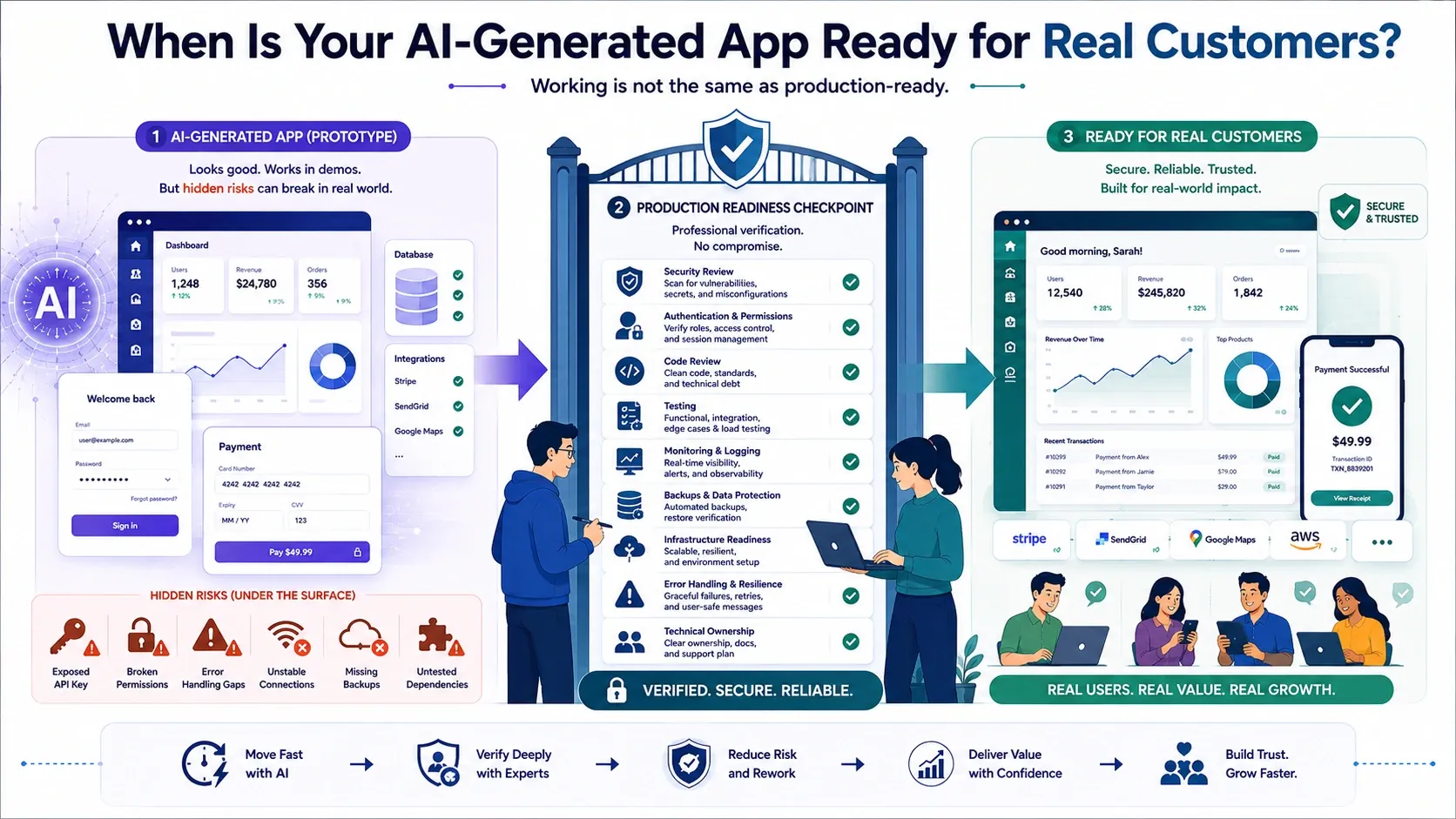
AI development tools can turn a written idea into a working application remarkably quickly.
Within hours or days, a founder may generate registration screens, dashboards, database connections, payment workflows, administrative tools, and third-party integrations. The application may look polished and perform successfully during a demonstration.
But does that mean it is ready for real customers?
Not necessarily.
A demonstration proves that the application can complete selected actions under controlled conditions. A production-ready MVP must perform reliably when real people use it in unexpected ways, submit incorrect information, lose their connection, forget passwords, attempt duplicate transactions, or access the application from different devices.
It must also protect customer information, control user permissions, recover from failures, and provide the team with enough visibility to identify and resolve problems.
An AI-generated app is ready for real customers when it has moved beyond simply appearing functional and has been professionally verified as secure, reliable, maintainable, and operationally supportable.
A Working App Is Not Automatically a Production-Ready App
AI is highly effective at generating visible functionality. If you request a customer portal with registration, subscriptions, and a dashboard, an AI tool may create all three.
However, the application may still contain hidden weaknesses such as:
- Users accessing information belonging to other accounts
- Insecure authentication or password recovery
- API keys exposed in the application
- Incorrect payment or refund handling
- Missing input validation
- Limited error handling
- Unreliable integrations
- Unsupported software dependencies
- Incomplete backups
- No monitoring or security alerts
- Code that becomes difficult to extend
- Missing legal or privacy requirements
These problems may not appear during a planned demonstration.
They usually become visible when real customers introduce unpredictable data, unusual behaviour, larger workloads, different devices, interrupted connections, and genuine security risks.
GitHub’s responsible-use guidance states that AI-generated code can appear valid while still being inaccurate or insecure. It recommends careful human review and testing, particularly for critical or sensitive applications.
The question should therefore not be, “Does the app work?”
It should be, “Has the app been verified under the conditions it will face after launch?”
Prototype Ready vs Customer Ready
| Area | Prototype ready | Customer ready |
|---|---|---|
| Main purpose | Demonstrate and explore an idea | Deliver reliable value to real users |
| Data | Sample or controlled information | Genuine customer and business data |
| User journey | Works during expected scenarios | Handles normal, invalid, and failed scenarios |
| Authentication | Basic login may be sufficient | Secure registration, login, recovery, and sessions |
| Permissions | Limited or unverified | Every role and data boundary is tested |
| Security | Basic configuration | Risk-based security controls are implemented |
| Testing | Founder-led demonstration | Functional, integration, security, and acceptance testing |
| Infrastructure | Temporary development environment | Controlled production environment |
| Monitoring | Often absent | Errors, availability, and suspicious activity are monitored |
| Recovery | Manual rebuilding may be acceptable | Backups and recovery processes are verified |
| Maintainability | Rapidly generated structure | Reviewed code, version control, and documentation |
| Support | No defined responsibility | Clear technical ownership and response process |
A prototype can still be valuable even when it is not ready for customers. It can help validate the concept, collect usability feedback, demonstrate the idea to stakeholders, and clarify the requirements for a professionally engineered MVP.
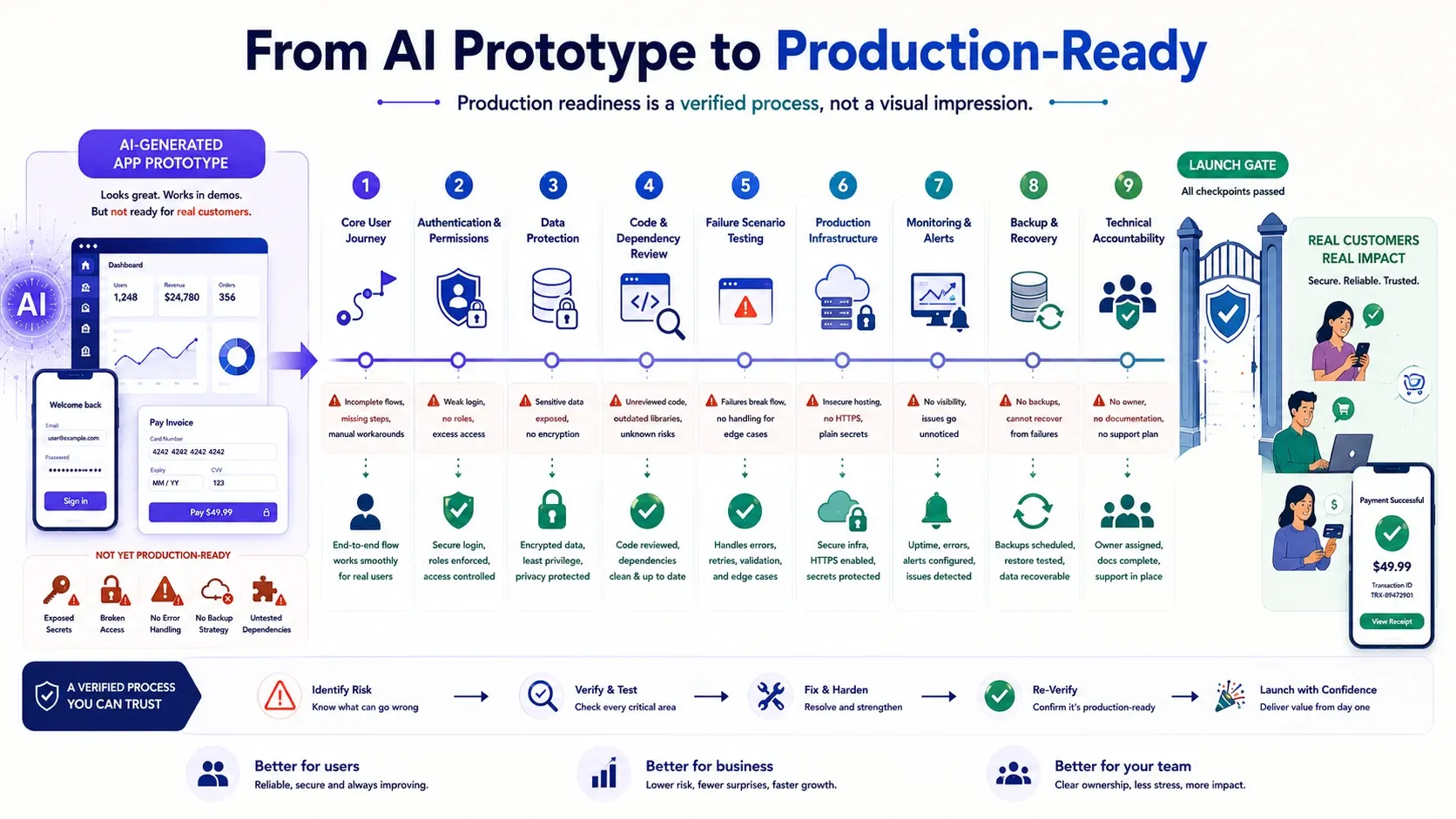
Nine Signs Your AI-Generated App Is Ready for Customers
1. The core customer journey works completely
The main user journey must work from beginning to end—not only on one developer’s device.
For example, if the product is a booking platform, the complete journey may include:
- Creating an account
- Finding an available service
- Selecting a time
- Making a payment
- Receiving confirmation
- Modifying or cancelling the booking
- Notifying the service provider
- Recording the transaction correctly
Every critical step must produce the expected business outcome.
The team must also define clear acceptance criteria. “The booking page works” is too vague. A meaningful criterion might state that a confirmed booking reserves the selected time, prevents duplicate reservations, records the payment, and notifies both parties.
2. Authentication and permissions have been verified
A working login screen does not prove that the application is secure.
The team must test:
- Registration and account verification
- Login and logout
- Password reset
- Session expiration
- Protection against repeated login attempts
- Administrator access
- Customer access
- Access between different customer accounts
- Deactivated or deleted users
- Sensitive actions requiring additional verification
Broken access control can allow users to view or modify data outside their permitted account. OWASP identifies access-control failures as a serious application risk because they may expose, alter, or destroy information.
Every user role should be tested independently. Changing a hidden field, URL, record number, or API request must not provide unauthorized access.
3. Customer data is protected appropriately
Before collecting real information, determine what data the application needs and why it needs it.
Consider:
- What personal information will be collected?
- Is every collected field necessary?
- Where will the information be stored?
- Is data encrypted during transmission and storage?
- Who can access it?
- How long will it be retained?
- Can a customer request its correction or deletion?
- Are third-party tools receiving any of the information?
- What happens if an account is compromised?
The required controls depend on the product. A public idea-validation tool and a healthcare platform do not carry the same level of risk.
Professional engineering applies security according to the sensitivity of the data, the potential impact of a failure, and applicable legal or contractual requirements.
4. Generated code and dependencies have been reviewed
AI-generated code should be treated as unverified until it has been inspected and tested.
A professional review should examine:
- Application architecture
- Business logic
- Authentication and authorization
- Input validation
- Database access
- Error handling
- Credential management
- External integrations
- Third-party packages
- Licensing concerns
- Duplicated or unnecessary code
- Known dependency vulnerabilities
- Maintainability and coding consistency
Automated tools can help detect problems, but they do not replace professional judgment. GitHub recommends combining automated tests and static analysis with human expertise when assessing AI-generated code.
The goal is not to reject code merely because AI produced it. Useful code can be retained when it meets the required standards.
5. Important failure scenarios have been tested
AI tools usually build the successful path described in the prompt. Real customers frequently encounter paths the prompt never mentioned.
The application should be tested for scenarios such as:
- Invalid or incomplete information
- Duplicate submissions
- Expired links
- Failed payments
- Repeated payment notifications
- Interrupted uploads
- Unavailable external services
- Slow network connections
- Simultaneous updates
- Deleted or unavailable records
- Insufficient permissions
- Unexpected browser behaviour
A failed operation must not corrupt data or leave the customer uncertain about what happened.
For example, if a payment succeeds but the confirmation request is interrupted, the system should not charge the customer again simply because they retry the page.
6. Production infrastructure is properly configured
An application should not be launched to customers directly from a temporary development environment.
A production environment should include:
- Secure hosting configuration
- Separate development and production settings
- Protected credentials and API keys
- Domain and HTTPS configuration
- Controlled database access
- Appropriate resource limits
- Automated or repeatable deployment
- Backup arrangements
- Recovery procedures
- Security updates
- Clear ownership of infrastructure accounts
The founder’s business should control essential accounts, including the domain, hosting, database, code repository, analytics, and third-party services.
This protects the product if a freelancer, AI platform, or development supplier becomes unavailable.
7. Monitoring and alerts are active
The team must know when the application is failing.
At minimum, production monitoring should provide visibility into:
- Application availability
- Server errors
- Failed integrations
- Unsuccessful payments
- Slow response times
- Unusual login activity
- Resource usage
- Critical business-process failures
OWASP explains that inadequate logging and monitoring can prevent teams from detecting and responding to security incidents. Important events such as failed logins, access-control failures, and high-value transactions should be recorded appropriately.
Monitoring does not prevent every failure, but it significantly reduces the time between a problem occurring and the team responding.
8. Backups and recovery have been tested
Having a backup setting enabled does not prove that the product can recover.
The team should confirm:
- What information is backed up
- How frequently backups are created
- How long they are retained
- Who can access them
- Whether backups are protected
- How long restoration will take
- Whether a restoration test has succeeded
If customer or transactional information is important, recovery must be treated as part of the product—not as an optional infrastructure feature.
9. Someone is accountable after launch
A production-ready application requires technical ownership.
Before launch, founders should know:
- Who investigates production errors?
- Who applies security updates?
- Who monitors hosting and database usage?
- Who responds if an integration fails?
- Who corrects urgent defects?
- What response time has been agreed?
- Who maintains technical documentation?
- Who decides whether a change is safe to release?
AI can assist with diagnosis and code generation, but it cannot accept commercial responsibility for downtime, data loss, security incidents, or failed customer transactions.
Professional accountability is one of the most important differences between an experimental prototype and a sustainable product.
A Practical Production-Readiness Checklist
Your AI-generated application should not be released to real customers until the essential items below can be confirmed.
Product readiness
- The target customer and core problem are clearly defined.
- The MVP has a controlled feature scope.
- The complete core journey works.
- Acceptance criteria have been documented.
- Realistic users have completed acceptance testing.
Engineering readiness
- The source code is accessible and owned by the business.
- The architecture and database have been reviewed.
- Important business rules have been verified.
- Dependencies have been assessed.
- Development and production environments are separated.
- The code is stored in a controlled version repository.
Security and privacy readiness
- Authentication and account recovery are secure.
- Permissions have been tested for every role.
- Secrets and API keys are protected.
- Sensitive data is handled appropriately.
- Common application risks have been assessed.
- Applicable privacy and compliance obligations have been reviewed.
Operational readiness
- Production deployment is repeatable.
- Monitoring and error reporting are active.
- Backups are configured, and restoration has been tested.
- A support and incident-response process exists.
- Technical ownership is clear.
- Users have access to relevant policies and support information.
Red Flags That Mean Your App Is Not Ready
Delay the customer launch if:
- You do not control or possess the source code.
- The product uses real data in a development environment.
- API keys are embedded in frontend code.
- Users can access records by changing a URL or ID.
- Payments have only been tested through the successful path.
- Nobody has reviewed the generated code.
- The application has no backups or monitoring.
- The team cannot explain how customer information is protected.
- There is no process for responding to production problems.
- Every AI-generated change creates new unexpected failures.
- The app works only when demonstrated by its creator.
These issues do not necessarily mean the idea or entire application should be discarded. They indicate that professional assessment and controlled remediation are required before real customers depend on it.
How to Turn an AI-Generated App into a Production-Ready MVP
The most efficient approach combines AI acceleration with professional engineering.
1. Preserve the prototype
Secure the source code, design files, database structure, prompts, configuration details, and third-party account information.
2. Define the real MVP scope
Separate the features required for customer validation from experimental or unnecessary functionality.
3. Perform a technical assessment
Review the architecture, code quality, dependencies, database, security, business logic, and infrastructure.
4. Decide what to retain
Keep components that are suitable, refactor those that can be corrected efficiently, and rebuild only the parts that create unacceptable risk.
5. Complete professional engineering
Implement missing security controls, error handling, permissions, integration safeguards, monitoring, backups, and maintainable code structures.
6. Test realistic scenarios
Test the successful journey, failure conditions, different roles, devices, browsers, integrations, and data conditions.
7. Launch to a controlled audience
Begin with a limited group of early adopters instead of exposing an unproven product to a large market.
8. Measure and improve
Monitor technical performance alongside activation, retention, successful journey completion, customer feedback, and willingness to pay.
This hybrid process preserves the speed and creativity of AI-generated development while introducing the safeguards required for sustainable real-world use.
Final Thoughts
Your AI-generated app is ready for real customers when its readiness is supported by evidence—not simply by a successful demonstration.
The core journey must work reliably. Customer information must be protected. Permissions, integrations, failure scenarios, backups, and monitoring must be verified. The source code and infrastructure must be under your control, and someone must remain accountable after launch.
AI can make product development significantly faster and more cost-effective. Professional engineers then apply the architecture, judgment, testing, security, and accountability required to convert that speed into a trustworthy product.
The strongest approach is therefore not AI development or traditional development in isolation.
It is AI-accelerated professional engineering.
MVPHUB helps founders assess AI-generated applications, retain the valuable components, resolve production risks, and transform promising prototypes into professionally engineered, market-ready MVPs.
💡 Built an app with AI and wondering whether it is ready for customers?
Let MVPHUB assess, secure, test, and prepare it for a confident market launch.
💡 Have a software idea?
Receive a focused MVP scope, fixed price and achievable delivery timeline.
Book a free consultation with MVPHUBFrequently Asked Questions
Can I launch an AI-generated app without hiring a developer?
A simple, low-risk application may be suitable for limited testing. However, professional review is advisable before processing customer accounts, personal information, payments, confidential business data, or critical workflows.
Does an AI-generated app need to be rebuilt?
Not always. Suitable code, designs, workflows, and database components may be retained. A technical assessment should determine what can be used, refactored, secured, or rebuilt.
What is the difference between a working app and a production-ready app?
A working app can complete selected functions. A production-ready app reliably handles real users, permissions, invalid inputs, failures, security risks, monitoring, backups, deployment, and ongoing support.
How long does a production-readiness assessment take?
The duration depends on the application’s size, technology, integrations, available documentation, and risk level. A focused MVP can usually be assessed more quickly than a large application containing numerous workflows.
Can AI-generated code be secure and maintainable?
Yes. AI-generated code can form part of a secure and maintainable application when it follows an appropriate architecture and is professionally reviewed, tested, corrected, documented, and monitored.
When should I involve a professional engineering team?
Involve professional engineers before real customers submit sensitive information, make payments, depend on the product operationally, or encounter failures that could cause financial, legal, security, or reputational damage.
